
WHAT WE’RE CAPABLE OF
Convert Slack Voice Notes to Social Media Content with Make
Original price was: $150.00.$100.00Current price is: $100.00.
Demo details
Demo Title:
Demo Summary:
This is a flow for social media content creation automation with make. This automation is designed to simplify social media content creation and publishing by converting voice recording to different types of social media contents. You get a free consultation when you buy this demo.
Demo Category:
Platform(s):
Apps & Plugins:
Selling Price:
Original price was: $150.00.$100.00Current price is: $100.00.
Demo Description
This is a flow for social media content creation automation with make designed to streamline your content creation and allow you to effortlessly convert your ideas to social media content on the go. This automation converts slack voice notes to social media content using make. Our goal is to simplify content creation and publishing through using powerful automation tools. Learn more about this automation below.
Convert Slack Voice Notes to Social Media Content with Make
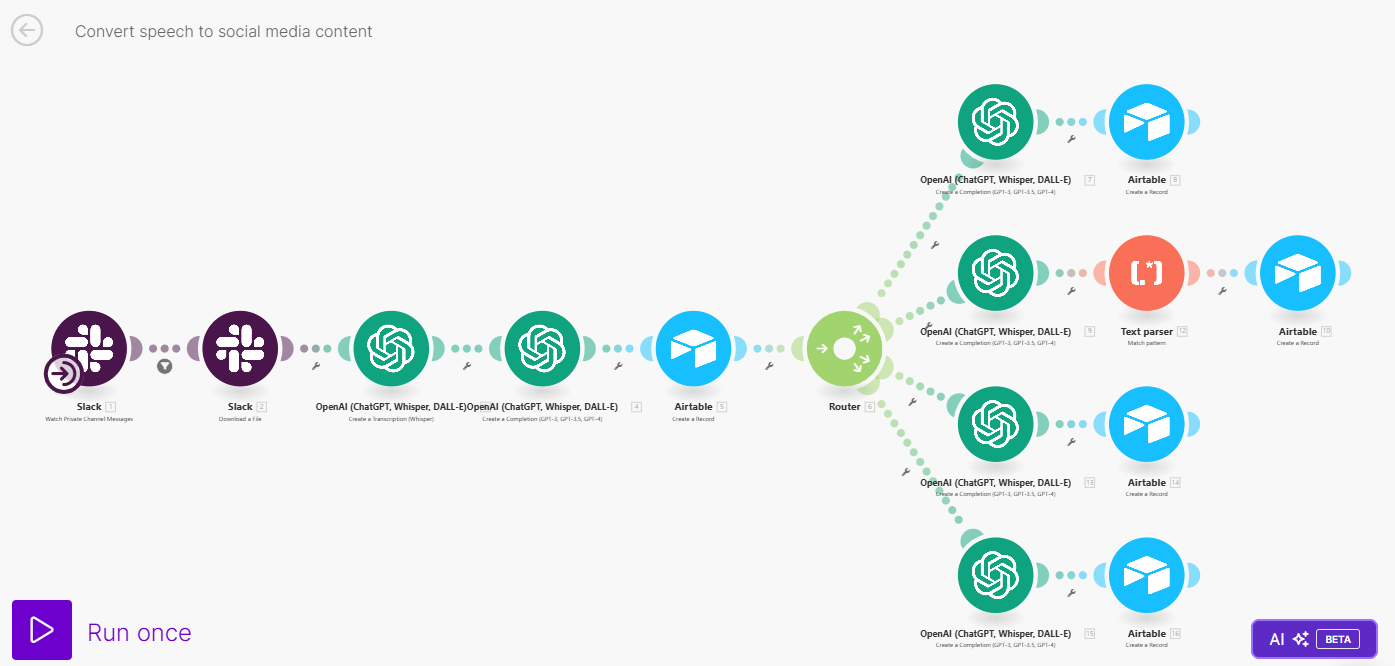
The automation starts by transcribing a voice recording from slack channel and generating content based on the content of the voice recording using ChatGPT. The content is streamlined to each social media platform (Facebook, Instagram Reel, Instagram Post, Linkedin, and X). The generated content are then saved in an Airtable sheet for proofreading and editing.
What Can You Do?
With this automation, you can;
- Convert recording your content idea to social media content like Facebook, LinkedIn, and Instagram.
- Generate Instagram posts
- Generate Instagram reels
The automation is design in two (2) phases.
Phase 1: From Slack Voice to Airtable
Phase one starts with a voice recording in slack. Record your content idea and key points in a message and send it to a prepared slack channel. Connect the channel to ChatGPT for transcription and converting the idea into a powerful social media content. The generated content is generic and not streamlined to a particular content, but it is detailed and information and only a few prompt away to be transform into content suitable for various social media platforms. This generated content is stored in airtable, waiting to be converted to social media content formats.
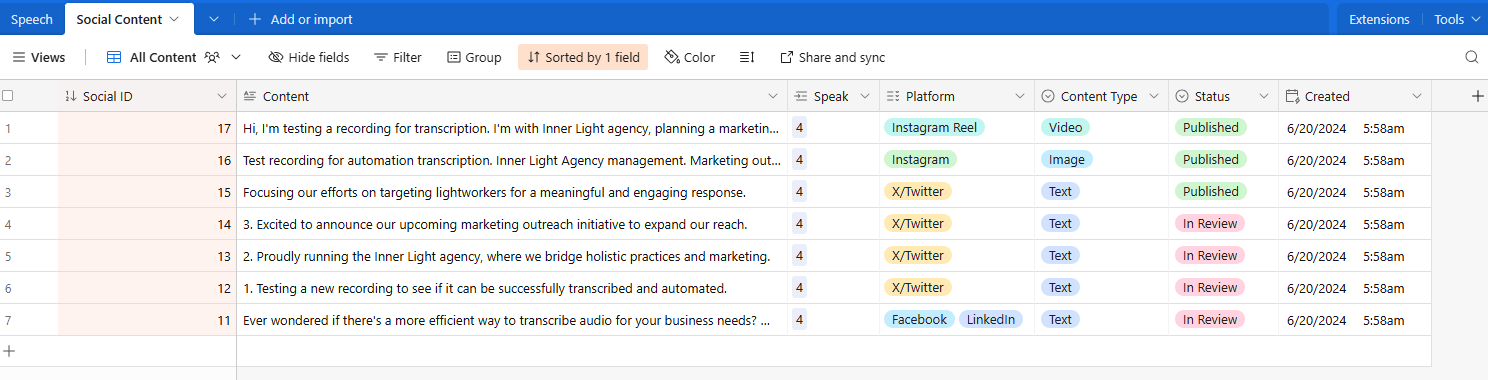
The prompt continues by converting the generic content into series of platform-specific social media content. The automation stores the contents in airtable, specifying which platform the content is created for.
At this stage, you can proofread, edit, or rewrite the content to your style. Once the editing is done, set the status to approve to trigger the second phase of the automation.
Phase 2: Convert to Video and Graphics Content and Publish
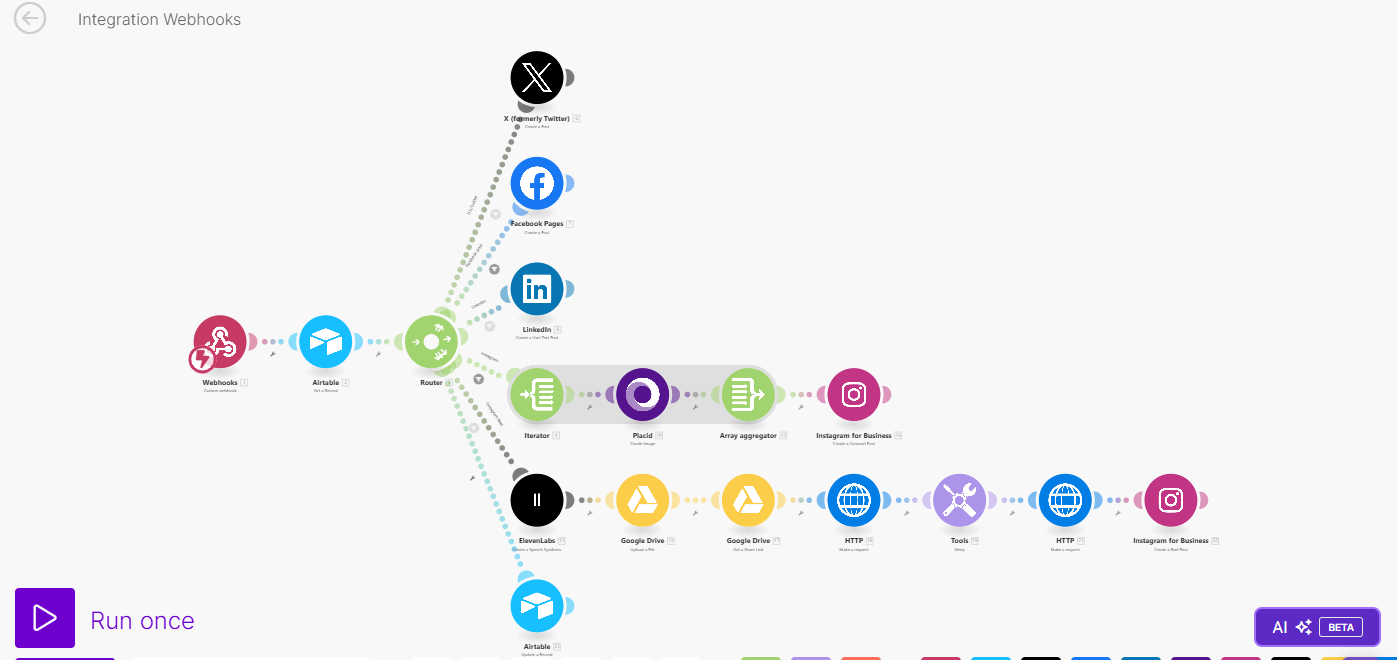
The second phase starts with a Webhook call made to the airtable base. This then process the approved content for publishing, or conversion to images or videos, as required by the content.
For the video generation, the automation uses a video from your gallery as background and generate voiceover using ElevenLabs. Then, using JSON2Video, the automation merges the video background and the voiceover to create a perfect reel for your Instagram.
For the image generation, design a template in Placid to be used as background and the automation will auto-populate the content for your instagram posts.
Apps and Roles
The automation uses the following apps below. Ensure you have access to these apps or alternatives before downloading this blueprint.
- Slack: For recording the content idea and key points
- ChatGPT: Transcribing the voice recording and generating content.
- Airtable: For storing the content for editing and processing for publishing
- Placid: For generating images and Instagram posts.
- ElevenLabs: for generate voiceovers for the video
- Google Drive: For storing voiceovers and generated media.
What's Included in the file
- Blueprint to convert Slack voice notes to social media content
- Blueprint to format the generated content into platform-specific type and generate Instagram reel videos and Instagram post images.
- Airtable base ready for import
- Installation guide.
Additional Notes
Please note, due to the discontinuation of X (Twitter) API by make, you will not be able to automate tweets using this blueprint. Click here to learn more about removal of X API by make.
Demo Gallery
Reviews
There are no reviews yet.