
WHAT WE’RE CAPABLE OF
Extracting Structured Data from Email Documents with Make
Original price was: $100.00.$70.00Current price is: $70.00.
Demo details
Demo Title:
Demo Summary:
Say goodbye to manually sorting through invoice emails, extracting details, and updating records! This automation streamlines invoice processing by combining Gmail, PDF.co, OpenAI, and Smartsheet—saving valuable time and reducing human error.
Demo Category:
Platform(s):
Apps & Plugins:
Selling Price:
Original price was: $100.00.$70.00Current price is: $70.00.
Demo Description
Gone are the days of manually sorting through invoice emails, extracting details, and updating records! This automation is designed to streamlines invoice processing by combining Gmail, PDF.co, OpenAI, and Smartsheet—saving valuable time and reducing human error. This automation allows you to extract structured data directly from your email, either as document or as text-based emails, automate invoice handling, and enable easy finance management.
Extracting Structured Data from Email Documents with Make
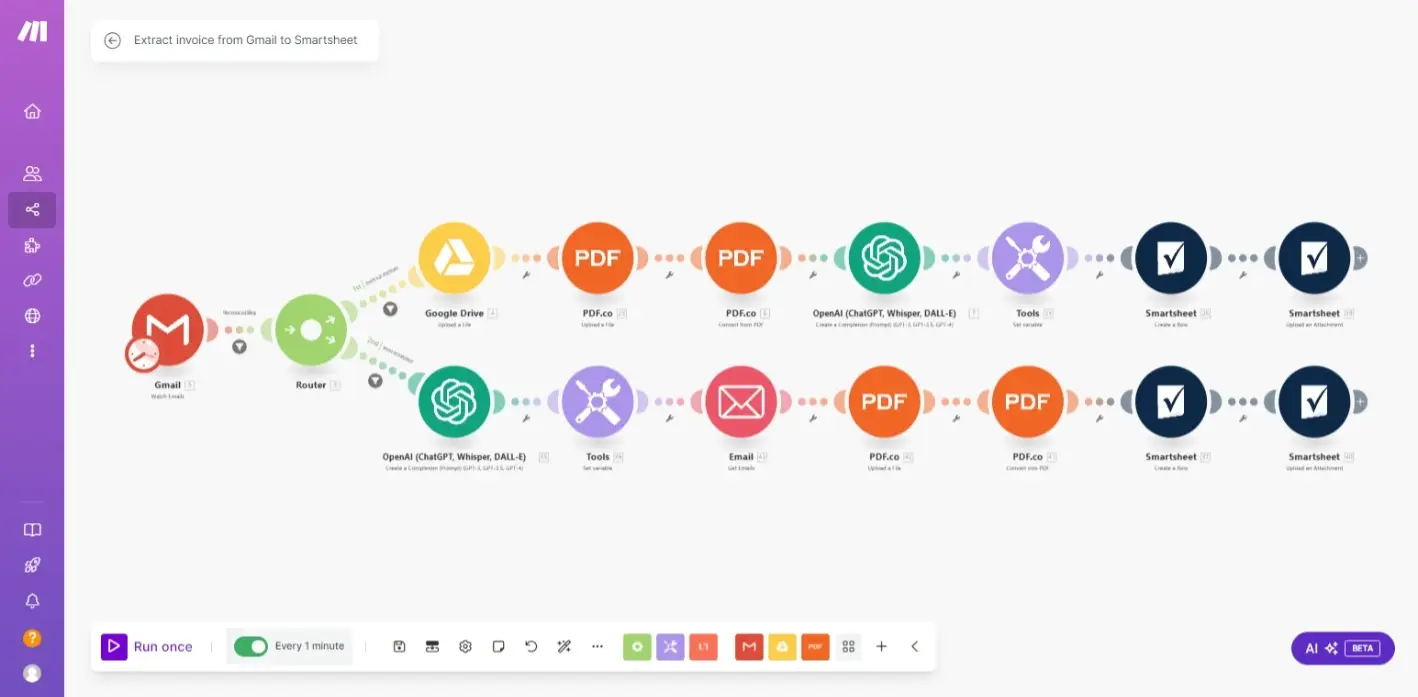
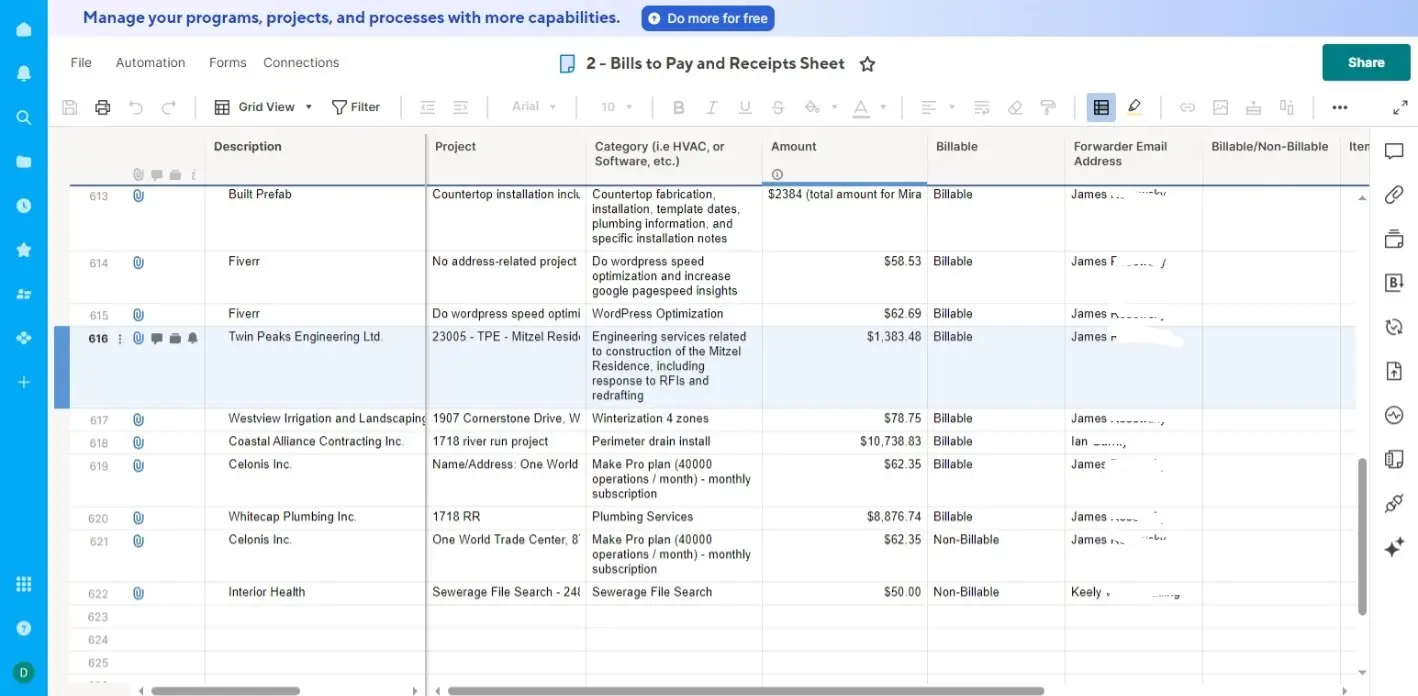
The automation extracts structured data from invoice emails, sent either as .PDFs or as a text-based emails to a Gmail account. The .PDFs files are downloaded, stored in a public Google drive and information are extracted from the data and transferred into a prepared Smartsheet table.
What Can You Do?
With this automation, you can;
- Download documents from emails and store them in a Google drive folder.
- Extract structured data from downloaded documents and save them in Smartsheet.
- Extract structured data from text-based emails and save them in Smartsheet.
- Auto-update Smartsheet rolls and sheets.
The automation is design in two (2) steps.
Step 1: Extracting Structured Data from PDF Files in Emails
The automation identifies incoming invoices and receipts in Gmail using a specified identifier, such as the subject line, sender email address, or a keyword in the body of the email. The identified document us then downloaded and stored in a Google drive folder that is made public so the automation is able to access it. Then, a PDF converter, such as PDF.co is used to convert the PDF file into text while OpenAI's ChatGPT extracts key information from the invoice.
The final step is the uploading of the extracted information into a worksheet prepared on Smartsheet. A good alternative would be Google sheet or other spreadsheet apps whose API can be accessed by Make. The automation is also capable of uploading the PDF file to Smartsheet.
Step 2: Extracting Structured Data from Invoice Emails Sent as Text
The automation follows the same step, but in this case, the invoice is not downloaded as PDF. Instead, ChatGPT extracts the needed information directly from email since its readable. Then the saves it in the Smartsheet worksheet.
Additional steps are also added to convert the text-based emails into .PDF format and uploads the file into the Smartsheet worksheet, thereby simplifying invoice handling and finance management.
Apps and Roles
This automation uses the following apps below. Ensure you have access to these apps or alternatives before downloading this blueprint.
- Gmail: The starting point is Gmail, which is where the invoice to be processed is received. Alternatives could be other email services whose API is supported by Make.
- Google Drive: For storing downloaded invoices.
- PDF.co: For converting .pdf files to texts readable by ChatGPT and converting text-based emails to .pdf format.
- OpenAI's ChatGPT: For data extraction and handling.
- Smartsheet: For storing the extracted information from the invoices. Alternatives could be Google sheet or other spreadsheet apps.
Expected Outcome Using This Automation
- Accuracy: Automated data extraction minimizes errors.
- Efficiency: Saves hours of manual work each week.
- Scalability: Easily adapts to high-volume invoice management.
What's Included in the file
- Blueprint for extracting structured data from emails
- Installation guide.
Demo Gallery
Reviews
There are no reviews yet.